
For search and rescue and off-grid trips
Send a message by light when there's no signal.
Signal Beacon flashes your message in Morse code with your iPhone's flashlight, and reads one back through the camera. No network, no pairing, no accounts.
Made for iPhone. Works with no signal at all.
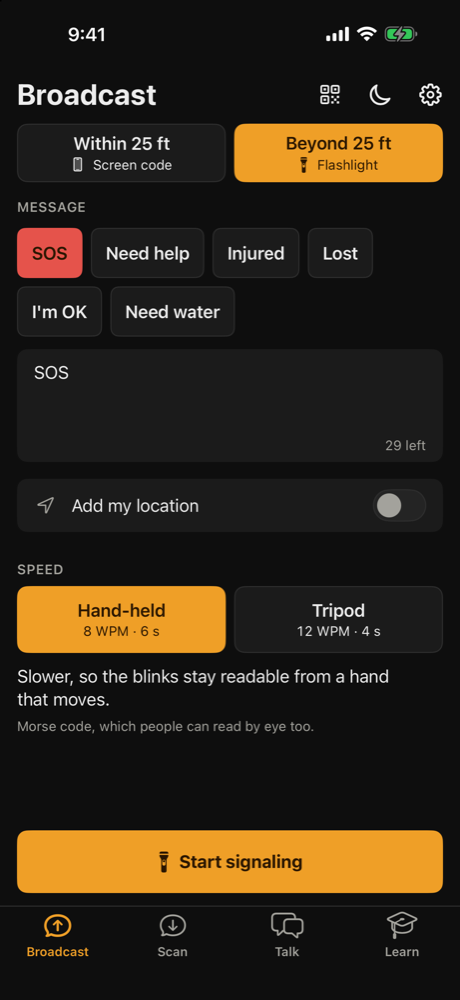
Three taps from one phone to another
- 1
Write it
Pick SOS or a quick message, or type your own. Add your location if you want to.
- 2
Flash it
The flashlight sends it in Morse code. It reaches as far as someone can see your light.
- 3
Read it
Their phone watches the light and spells out the message. People can read it by eye too.
See it in action
Built for when it counts
Flashlight Morse
Send SOS or any message with the light on your phone. Slow, steady blinks that stay readable from a moving hand.
Reads with the camera
Tap the light to lock on. A forgiving reader copes with shaky hands and real, hand-sent Morse.
No signal needed
No cell service, Wi-Fi, Bluetooth or pairing. Nothing to set up and no account to make.
Talk back and forth
Put two phones on tripods, backs facing each other, and trade short lines by light.
Night mode
A red-only view keeps your eyes dark-adapted, with a camera preview that does the same.
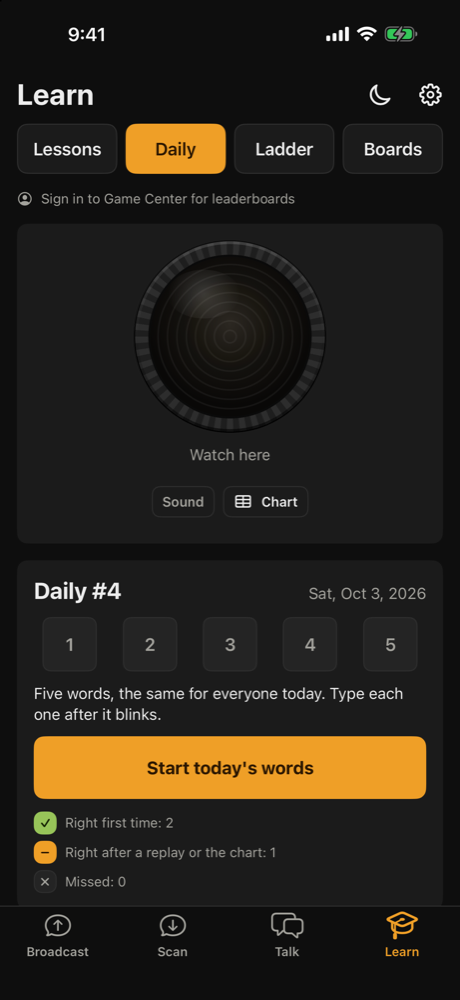
Learn Morse
Short lessons, a daily challenge everyone shares, and leaderboards. Play on the web.
No iPhone? No problem
Read a beacon in your browser
Works on any phone with a camera. It isn't the full app, but it's enough to read a light someone is sending, or send one back.
Try it now
In your browserPoint the camera at someone's blinking light, then tap the light to lock on.
Messages
Messages you read show up here.
Details
Start reading to see what the camera sees.
Flashes your message in Morse code with the flashlight where the browser allows it, otherwise with the whole screen.
Turn brightness all the way up. A screen only carries a short way; a flashlight goes farther.
Be findable when the signal isn't there.
Get Signal Beacon before you need it.